







Add Custom Code to WordPress

Without Editing Theme Files

CSS & JavaScript Toolbox gives you one organized place to add and manage custom CSS, JavaScript, PHP and HTML across your WordPress website. Create reusable code blocks, control exactly where they run, and keep your customizations manageable — without constantly editing theme files or installing another plugin for every small change.

Free to get started. Upgrade when you need more control.

4.8 out of 5 Ratings

Trusted by WordPress Users

Organizations who trust CJT

For years, CJT has helped WordPress users, developers and organizations manage custom code without turning their website into a collection of scattered snippets and unnecessary plugins.

A Cleaner Way to Customize WordPress

There's a Better Place for Your Custom Code

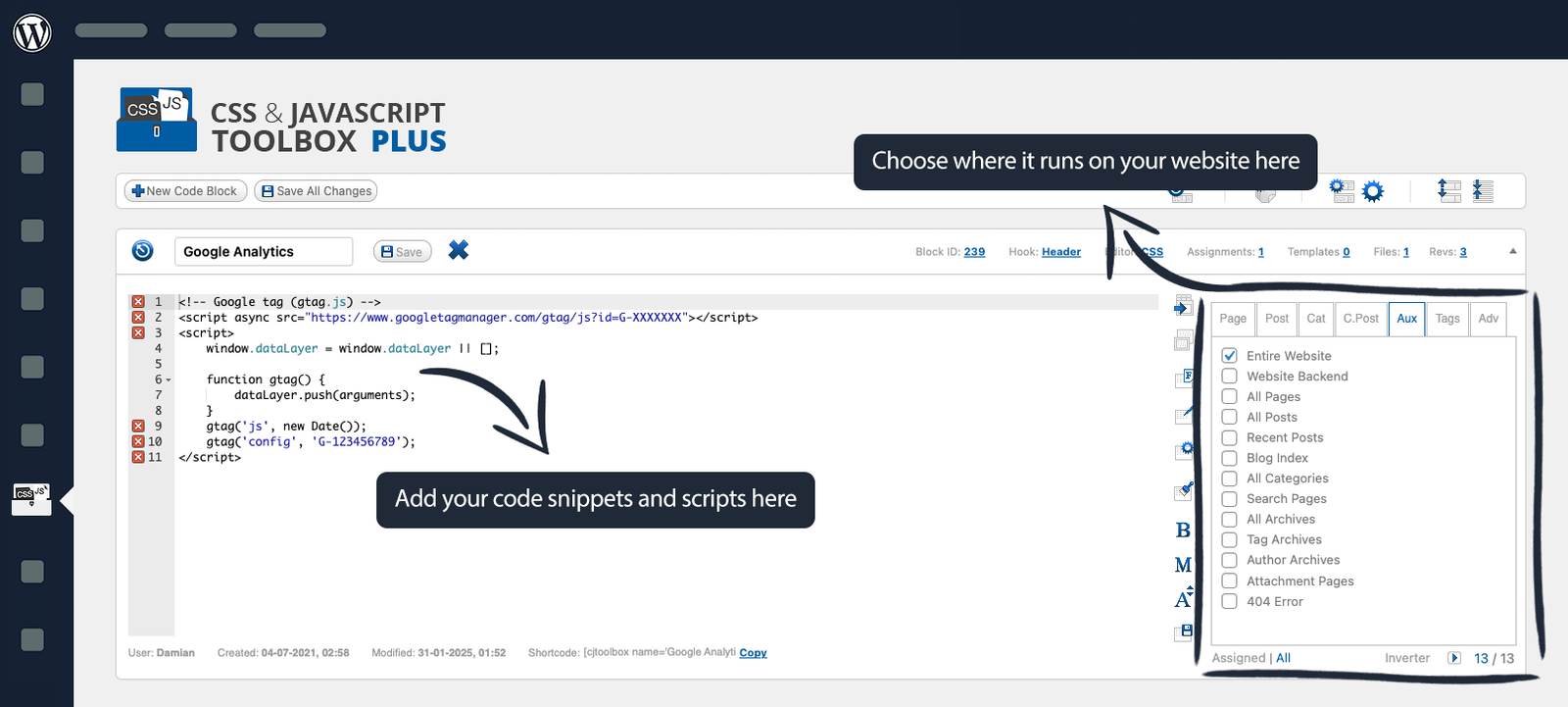
CJT brings your custom code into one manageable WordPress workspace. Create individual Code Blocks for different jobs, choose where they should run, edit them when necessary, and keep your customizations separated from your theme.
×

Without CJT

  • Editing functions.php for every PHP customization
  • Pasting scripts into different theme settings
  • Adding plugins for simple functionality
  • Searching through files to find old code
  • Applying snippets globally when they only belong on one page

With CJT

  • Keep custom code organized in individual Code Blocks
  • Work with CSS, JavaScript, PHP and HTML
  • Assign code to the content where it's actually needed
  • Manage changes directly from WordPress
  • Build a cleaner, more maintainable customization workflow
Your custom code stays organized, accessible and easier to maintain.
Keep your customizations separate from your theme while managing everything from one familiar WordPress workspace.

One Toolbox. Endless possibilities

More Control Over Your WordPress Code.

Whether you’re making a quick CSS adjustment or managing advanced custom functionality, CJT gives your code a proper home.

Create Organized Code Blocks

Separate customizations into individual Code Blocks instead of building one giant collection of snippets. Give each task its own place so it’s easier to understand, edit and maintain.

Put Code Where You Need It

Apply code to specific pages, posts, custom post types and categories. CJT PLUS expands your targeting options with tags, site-wide placements, URLs, Regex and additional locations.

Work in the Languages You Already Use

Manage CSS, JavaScript, PHP and HTML from inside WordPress with syntax-aware editing.

Add Scripts Without Theme Editing

Add analytics, chat widgets, tracking scripts and other third-party code without repeatedly modifying your WordPress theme.

Build Functionality Without Another Plugin

For smaller custom features, use JavaScript or PHP Code Blocks instead of automatically reaching for another single-purpose plugin.

Protect Your Work With Revisions

Keep previous versions of your Code Blocks so changes don’t have to mean losing working code.

greater things for you

Meet CJT PLUS

CJT Free gives you the foundation. CJT PLUS turns that foundation into a more powerful development workspace. Unlock advanced editing, more precise code placement, additional WordPress integrations, reusable tools and features designed for people who regularly customize WordPress.

Advanced Editor Tools

Work faster with full-width and full-screen editing, code beautification and minification, autocomplete, syntax highlighting and 32 light and dark editor themes.

Advanced Code Placement

Go beyond basic page and post assignments. Target tags, your entire website, specific URLs or dynamic URL patterns with Regex.

More WordPress Integration

Use additional output hooks, Gutenberg support, widgets, enhanced shortcode tools and other placement options.

Reusable Templates

Turn frequently used code into reusable templates and packages instead of rebuilding the same solutions repeatedly.

Better Code Management

Take advantage of additional Code Block tools, revisions and Code Files to keep larger customizations organized.

Code Backups

Keep previous versions of your Code Blocks so changes don’t have to mean losing working code.

why they love cjt plus

What our customers say about CJT PLUS

We are incredibly humbled to have so many happy CSS & JavaScript Toolbox PLUS customers, we decided to let them speak for us. This is a small selection of the emails, reviews, and feedback we receive.

Just what I was locking for..

Wonderful tool, superb support! Thanks.

transformis on WordPress.org
Nice plugin!

A bit complex but indeed useful! Not for newbies. A big piece of script. Thank you!

Marcelo Pedra
This plugin saves me hours of time
This is my most used plugin. It’s incredibly useful. It allows incredible customisation to a WordPress install.
Carob Cherub

Start Free

Upgrade When Your Workflow Demands More.

You don’t need to buy CJT PLUS to discover whether CJT works for you. Start with CJT Free and get the core tools for adding custom code to WordPress. When you need advanced targeting, editing and workflow features, move to PLUS.
Best Value

Lifetime

$ 199 /one-time

Perfect solution for agencies and savvy entrepreneurs.

Get Started
  • Unlimited website installations
  • Lifetime of automatic updates
  • Lifetime of forum access
  • 1 year of support
  • Unlimited Code Blocks
  • Unlimited Revisions
  • Unlimited Users
  • Unlimited Assignments
For Growing Sites

Boost

$ 55 /year

Great for maximizing your business potential.

Get Started
  • 1 year of automatic updates
  • 1 year of support
  • 1 year of forum access
  • Unlimited Code Blocks
  • Unlimited Revisions
  • Unlimited Users
  • Unlimited Assignments

FAQ

Whether you’re curious about Silk’s features, data handling capabilities, or integration options, we’ve got you covered.

CJT Plus Plugin offers a myriad of benefits for your website. It empowers you to effortlessly customize your WordPress site, add custom code snippets, and enhance its functionality without coding knowledge. With its best features, you can streamline your workflow, improve site performance, and create a unique user experience. Additionally, CJT Plus Plugin provides regular updates and excellent support, ensuring your website stays up-to-date and optimized for success.
Yes, CJT Plus Plugin is suitable for users of all skill levels. Whether you’re a beginner with limited coding experience or an advanced developer, CJT Plus offers intuitive tools and features to customize your WordPress site easily. With its user-friendly interface, comprehensive documentation, and helpful support, CJT Plus empowers users to create custom solutions without the need for extensive technical expertise. Whether you’re making simple tweaks or implementing complex customizations, CJT Plus provides a flexible platform to meet your needs and enhance your website’s functionality.
CJT Plus Plugin offers a range of features tailored to enhance your website’s functionality. From customizable code blocks and templates to shortcode and metabox options, it empowers users to customize their WordPress sites effortlessly. With CJT Plus, you can elevate your website’s aesthetics, optimize performance, and streamline your workflow with ease.
Yes, you can easily integrate CJT with your existing website. It’s designed to seamlessly integrate with WordPress, allowing you to enhance your website’s functionality and appearance without any hassle. Whether you’re a beginner or an experienced developer, CJT provides intuitive tools and features to customize your website according to your specific needs and preferences. With its user-friendly interface and comprehensive documentation, you’ll be able to effortlessly integrate CJT into your website and unlock its full potential to create a unique and professional online presence.
CJT is designed to be flexible and compatible with a wide range of plugins and themes. However, it’s always recommended to test compatibility with specific plugins and themes in your development environment to ensure smooth integration.

Yes, CJT is fully compatible with third-party plugins and themes. Its flexible design allows seamless integration with various WordPress plugins and themes, ensuring smooth functionality without conflicts or compatibility issues.

Ready to Get Started with CJT?

Install and activate CJT on your WordPress site, then start creating and managing custom code blocks from one powerful dashboard. Explore flexible tools, templates, and resources to customize your site with confidence.
CSS & JavaScript Toolbox makes it easy and secure to enhance your WordPress site with custom code snippets.

Newsletter

© 2026. CSS & JavaScript Toolbox. All rights reserved.